




Overview of LCD Display Types and Technology
Liquid Crystal Display (LCD) technology is at the heart of digital displays across various industries, from televisions and computer monitors to mobile devices and professional display environments. Over time, LCD technology has evolved from simple monochrome static displays to high-resolution color displays with advanced active-matrix systems, resulting in a diverse range of display products. When selecting the best display for retail signage or LCD displays for gaming monitors, it’s important to understand the different types and their characteristics.
Core Classification System:
- By Color Display: Monochrome (Monochrome) and Multi-color/Color (Multi-Color/Color)
- By Driving Method: Static/Direct Drive and Multiplex Drive
- By Liquid Crystal Alignment Technology: TN (Twisted Nematic), VA (Vertical Alignment), IPS (In-Plane Switching)
- By Matrix Control Method: Passive Matrix and Active Matrix (e.g., TFT)
Exploring Monochrome LCD Displays
1. Segment Display (Static/Direct Drive LCD)
Technology Principle: Uses the direct drive method, where one pin corresponds to one segment. It is a simple and reliable technology, typically used for displaying numbers and basic icons.
Typical Applications: Basic digital signage, calculators, dashboards, digital clocks, and industrial interface displays.
Core Advantages:
- Ultra-low power consumption (as low as 6µA/cm²)
- High reliability and long lifespan
- Customizable to wide temperature ranges
- Low cost, ideal for high-volume applications
Threshold for Use: Most cost-effective when the number of segments is ≤ 20. Ideal for cost-effective retail signage and industrial meters.
2. Multiplex Display (Multiplex LCD)
Technology Principle: One pin controls multiple segments, reducing the pin count by using time-division multiplexing.
Core Advantages:
- Reduces I/O interface requirements, lowering system complexity and cost
- Suitable for medium-complexity displays (20-120 segments), making it ideal for industrial controllers and multi-functional displays.
Potential Limitations:
- Lower refresh rates, leading to potential "ghosting"
- Slightly reduced viewing angles and contrast compared to direct drive displays
Typical Use Cases: Devices with higher segment counts that don’t require full graphical display, such as multi-functional industrial controllers, advanced utility meters, and health monitoring devices.
Comparing Color LCD Technologies
1. TN (Twisted Nematic)
Response Time: Fastest (1-5ms), making it ideal for gaming monitors and fast-refresh applications.
Viewing Angle: Narrow (typically 160°/170° horizontally/vertically)
Color Performance: Relatively average, with a narrower color gamut.
Contrast Ratio: Moderate
Core Positioning: Best for applications where extreme response time is prioritized and cost sensitivity is high, such as gaming displays, budget monitors, and basic consumer electronics.
2. VA (Vertical Alignment)
Response Time: Moderate (5-10ms)
Viewing Angle: Good (typically 170°/178°)
Color Performance: Better than TN, with good color depth and saturation.
Contrast Ratio: Highest (usually 3000:1 or more), with deep black levels.
Core Positioning: Ideal for multimedia and consumer applications where image quality and contrast are prioritized, such as home TVs, multi-screen setups, and general-purpose monitors.
3. IPS (In-Plane Switching)
Response Time: Moderate (4-8ms)
Viewing Angle: Best (typically 178°/178°)
Color Performance: Excellent, with superior color accuracy, color gamut, and consistency.
Contrast Ratio: Good (usually 1000:1 - 1500:1)
Core Positioning: Best for professional applications where color accuracy and stable viewing angles are critical, such as graphic design, medical imaging, high-end commercial displays, and retail signage.
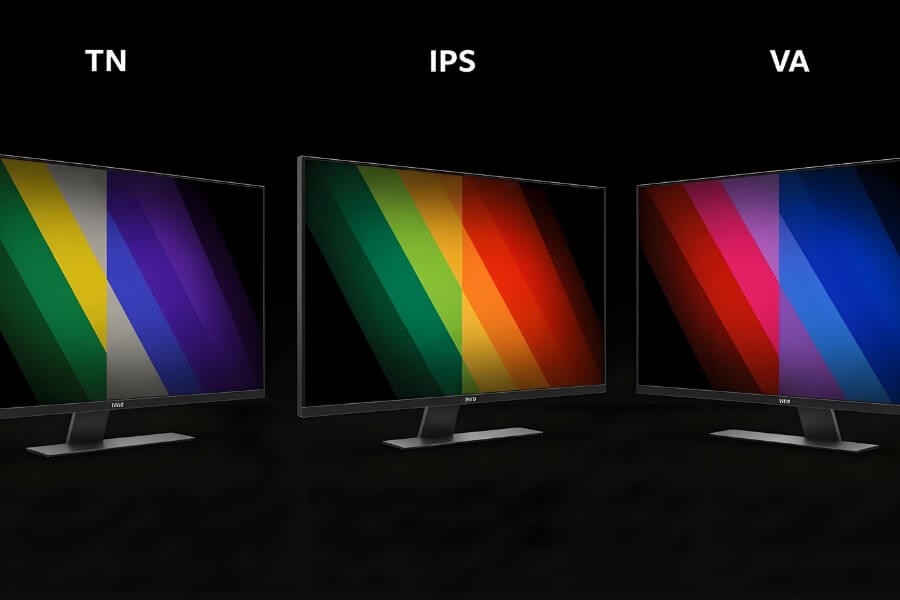
Technology Comparison Table:
| Feature | TN | VA | IPS |
|---|---|---|---|
| Response Time | ★★★★★ | ★★★☆☆ | ★★★★☆ |
| Viewing Angle | ★★☆☆☆ | ★★★★☆ | ★★★★★ |
| Color Accuracy | ★★☆☆☆ | ★★★☆☆ | ★★★★★ |
| Contrast | ★★★☆☆ | ★★★★★ | ★★★★☆ |
| Power Consumption | Lowest | Moderate | Moderate to High |
| Cost | Lowest | Moderate | Higher |
Advanced LCD Technologies and Applications
1. High-Performance Derivative Technologies
- HTN (High Twisted Nematic): Improved contrast and viewing angles compared to standard TN, often used in mid-range monochrome displays.
- FSTN (Film Super Twisted Nematic): Adds a compensating film layer for enhanced contrast and readability, commonly used in automotive instruments and industrial displays.
- AFFS (Advanced Fringe Field Switching): An enhanced version of IPS, offering superior viewing angles and color performance, often used in high-end, professional environments like avionics and medical displays.
- PLS (Plane Line Switching): Developed by Samsung, this is a variant of IPS offering higher brightness and lower power consumption, ideal for high-end monitors and tablets.
2. Panel Grading Standards (TFT LCD)
- A++ Grade: No dead pixels
- A+ Grade: 1-3 dead pixels
- A Grade: Typically ≤ 5 dead pixels (standards may vary by region)
- B/C Grade: More than 5 dead pixels, used in highly cost-sensitive applications
LCD Innovation in Professional Large Screens and Digital Signage
1. Video Walls and Large Digital Signage Systems
Technology Implementation: Uses ultra-narrow bezel LCD panels (<1mm) for seamless video wall installations, combined with specialized controllers for screen synchronization and calibration.
Core Advantages:
- High brightness (700-2000 nits) for indoor and outdoor environments
- 7x24-hour continuous operation stability
- Supports advanced features like multi-screen segmentation and content roaming
Emerging Trends:
- AI Content Adaptation: Automatically adjusts content based on audience demographics and time of day
- Interactive Video Walls: Integrates touch, gesture, and facial recognition technologies
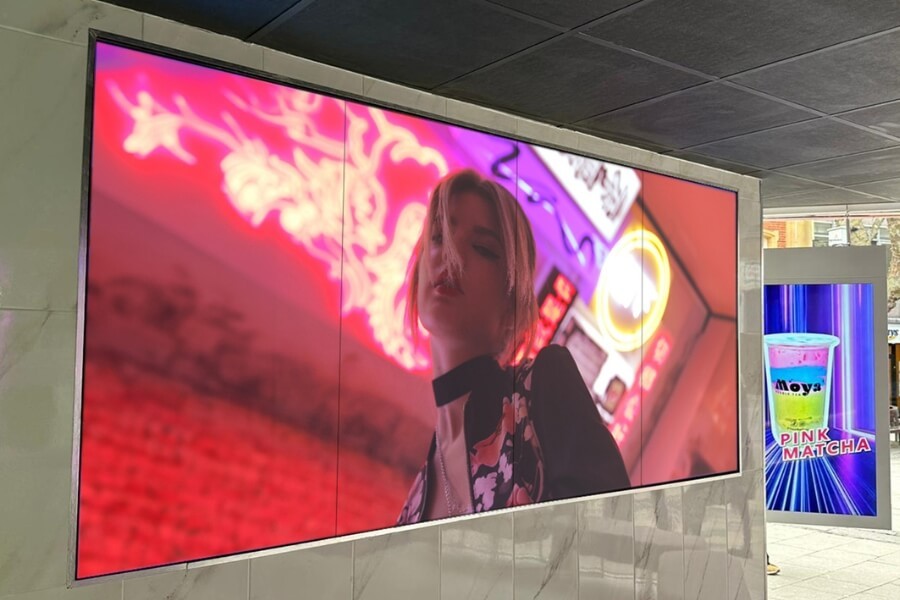
2. High-End Commercial Space Display Solutions
Custom Displays for Retail, Showrooms, and Corporate Lobbies:
- Free-standing Digital Displays: For product showcases and brand experiences
- Wall-mounted Systems: Integrated with architectural décor for immersive visual environments
- Ceiling-mounted Displays: Create aerial visual focal points and guide audience flow
- Interactive Digital Tables: Featuring multi-touch and RFID recognition for enhanced user engagement
The Future of LCD Technology
1. LCD and OLED Hybrid Innovation
- Hybrid Display Systems: LCD for background information and transparent OLED for foreground interactive layers
- Local Dimming Technology: Mini-LED backlighting combined with LCD panels to achieve near-OLED contrast levels
- Switchable Transparent LCD: Allows for adjustable transparency, suitable for varying scene requirements
2. AI-Driven Smart Display Systems
- AI Content Generation: Automatically adjusts display content based on environmental factors, audience, and time
- Adaptive Display Parameters: Optimizes brightness, contrast, and color based on ambient light and viewer distance
- Predictive Maintenance: Uses sensors and AI algorithms to forecast display issues, enabling preemptive maintenance
3. Sustainability and Green Display Technologies
- Low Power Design: New backlight technologies and driver ICs reduce power consumption by 30-50%
- Recyclable Materials: Use of eco-friendly materials in panel construction, increasing recyclability
- Long Lifespan Design: Key components designed to last 100,000 hours, reducing electronic waste
4. Ultra-Large Seamless Displays for the Future
- Micro-LED Backlight LCD: Supports over 2000 individual dimming zones, achieving OLED-like picture quality
- Flexible LCD Technology: Adaptable to non-flat installation environments
How to Choose the Right LCD Display
1. Key Decision Factors:
- Content Type: Static information vs. dynamic video vs. interactive content
- Viewing Environment: Indoor vs. outdoor, light conditions, viewing distance and angle
- Interaction Requirements: Touch, gesture, or multi-user interaction
- Operational Requirements: Durability, reliability, and ease of maintenance
- Budget Range: Initial investment vs. total cost of ownership
2. Scenario-Based Recommendations:
- Retail Digital Signage: High-brightness IPS or VA panels with remote content management
- Corporate Showrooms: Ultra-narrow bezel video walls combined with interactive transparent displays
- Control Rooms: High-reliability IPS panels, designed for 7x24-hour operation
- Outdoor Billboards: High-brightness, wide-temperature range LCDs with auto-brightness adjustment
3. Integration Considerations:
- System Compatibility: Display interfaces (HDMI/DP/USB-C), control protocols, mounting structures
- Content Management Systems: Support for multiple formats, remote updates, scheduling
- Installation and Maintenance: Front/Rear maintenance designs, modular replacements, heat dissipation considerations
FAQ
Q1: What are the main types of LCD displays and how do they differ?
LCD displays are classified into monochrome (segment and multiplex) and color (TN, VA, IPS). Monochrome displays are simpler and cost-effective, while TN, VA, and IPS offer varying response times, viewing angles, and color accuracy suitable for different applications.
Q2: How do TN, VA, and IPS panels compare?
TN panels provide the fastest response time but have limited color accuracy and narrow viewing angles. VA panels offer better contrast and color reproduction, while IPS panels deliver the best color accuracy and wider viewing angles, making them ideal for professional applications.
Q3: What type of LCD display is best for retail signage?
For retail signage, IPS or VA panels are recommended. IPS offers superior color accuracy and wide viewing angles, while VA provides excellent contrast, making them suitable for vibrant, high-impact displays.
Q4: What are the basics of LCD display technology?
LCD displays use liquid crystals between two polarized filters to control light passage. They require a backlight and can display content through liquid crystal alignment technologies like TN, VA, and IPS, which affect the display’s performance and viewing experience.
RusinDisplay delivers professional OLED, Transparent Display, and Indoor LCD solutions with rapid 3D scene creation, reliable performance, and support from over 120 global brands. Our systems help businesses increase foot traffic and achieve fast ROI while enjoying steady technical support and seamless after-sales service. Whether you're looking for cutting-edge OLED technology or traditional LCD applications for digital signage, our solutions offer flexibility and innovation across a variety of environments. With AI-driven interaction and a Tech in Nature design philosophy, we create visual experiences that blend innovation with modern commercial environments.