




Round displays are circular-shaped display modules used in systems where interface design follows radial layouts.
They are typically based on LCD or OLED technology and are designed for compact, intuitive, and visually aligned interfaces.
These displays are widely used in smartwatches, dashboards, and control systems where fast and familiar data interpretation improves usability.
What Is a Round Display and How Is It Different
A round display refers to a screen with a circular active display area rather than a rectangular one.
The core technology remains the same as standard displays, but the structure and manufacturing process are different.
Key differences include:
- Circular panel cutting
- Specialized backlight design for LCD
- Compact internal component layout
This means round displays are not a new display technology.
They are a structural adaptation designed for specific interface needs.
Why Are Round Displays Used in Modern Devices
Round displays are used because they match how users interact with certain types of information.
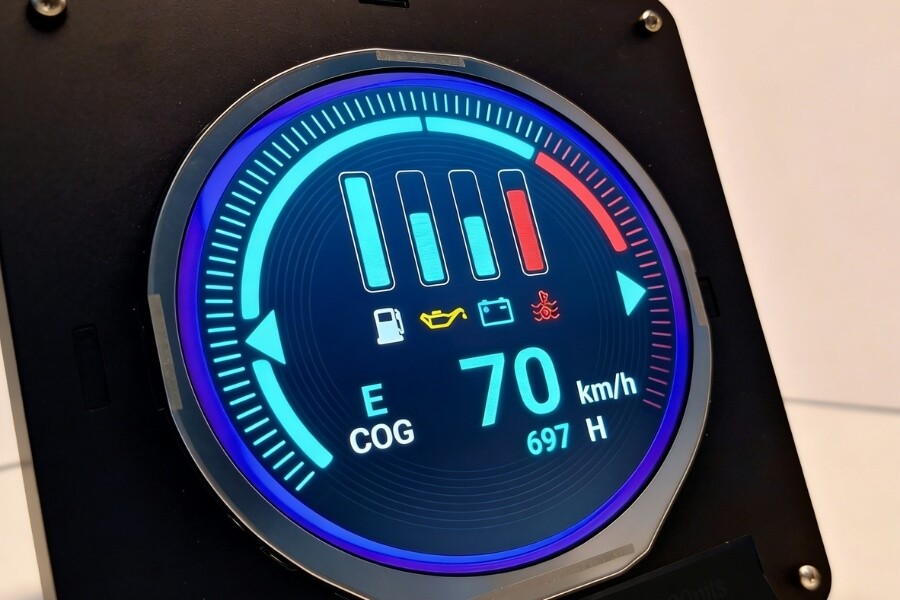
Interface alignment with circular systems
Many systems are naturally circular:
- Speedometers
- Pressure gauges
- Rotary controls
A round display keeps this visual structure.
This helps users read data faster because the layout matches familiar patterns.
Efficient use of limited space
Rectangular screens leave unused corners in circular devices.
A round display fits directly into circular housings and panels.
This improves mechanical integration and reduces wasted space.
It also simplifies product design and assembly.
Better support for radial data visualization
Round layouts are well suited for:
- Rotational indicators
- Progress rings
- Layered circular menus
This allows dynamic data to be displayed in a way that is easier to interpret at a glance.
It is especially useful in monitoring and control scenarios.
How Round Displays Work in LCD and OLED Systems
Round displays follow the same basic display principles, but structural design becomes more complex.
LCD-based round displays
A typical LCD round display includes:
- TFT glass and liquid crystal layer
- Backlight unit
- Polarizers and optical films
- Optional touch layer
The main challenge is the backlight.
A circular backlight must distribute light evenly across a curved area.
If not properly designed, edge shadow can occur, which reduces readability in instruments and control panels.
OLED-based round displays
OLED displays do not require a backlight.
Each pixel emits its own light.
This provides several practical benefits:
- True black levels improve contrast in dark environments
- Thinner structure helps reduce device thickness
- No backlight simplifies circular design
This is why OLED is commonly used in wearables and compact smart devices.
What Are the Advantages of Round Displays in Real Applications
Faster data interpretation
Round displays match how circular data is read.
This reduces reaction time in dashboards and monitoring systems.
Better product integration
They fit naturally into circular device structures.
This reduces design constraints and improves assembly efficiency.
Strong visual differentiation
Circular displays stand out compared to standard screens.
They help products achieve a more modern and distinctive appearance.
Flexible customization
Round displays can be adapted in terms of:
- Size and resolution
- Brightness and interface
- Touch integration
This allows the display to match both technical and design requirements.
What Are the Limitations of Round Displays
Backlight complexity in LCD designs
Circular backlight design is more difficult.
Uneven brightness can affect visibility, especially in precision equipment.
Lower production efficiency
Round panels are cut from rectangular substrates.
This reduces material usage efficiency and increases cost.
Reduced effective display area
The pixel matrix is still rectangular.
Corners are unused, which reduces the effective display area.
This means a round display may show less information than a rectangular screen of similar size.
UI adaptation challenges
Standard UI layouts do not fit circular screens.
Designers must:
- Adjust layout to radial structures
- Avoid placing key content near edges
- Optimize scaling for curved boundaries
This increases design complexity but improves user experience when done correctly.
Round vs Rectangular Displays Which One Should You Choose
The choice depends on how the display will be used.
| Factor | Round Display | Rectangular Display |
|---|---|---|
| Interface type | Circular and radial | Linear and grid-based |
| Space usage | Efficient in round devices | Better for full content display |
| UI design | Requires custom layout | Standard UI supported |
| Cost | Higher | Lower |
| Best use | Gauges, wearables, control panels | General-purpose applications |
When to choose a round display
- When replacing analog gauges
- When the interface is circular
- When product design requires a compact round structure
When not to use a round display
- When displaying large amounts of text or data
- When standard UI frameworks are required
- When cost efficiency is the primary concern
This helps avoid unnecessary design complexity.
Where Are Round Displays Used
Industrial and professional equipment
Used in:
- Control panels
- Measurement devices
- Compact dashboards
They improve readability while maintaining familiar visual behavior.
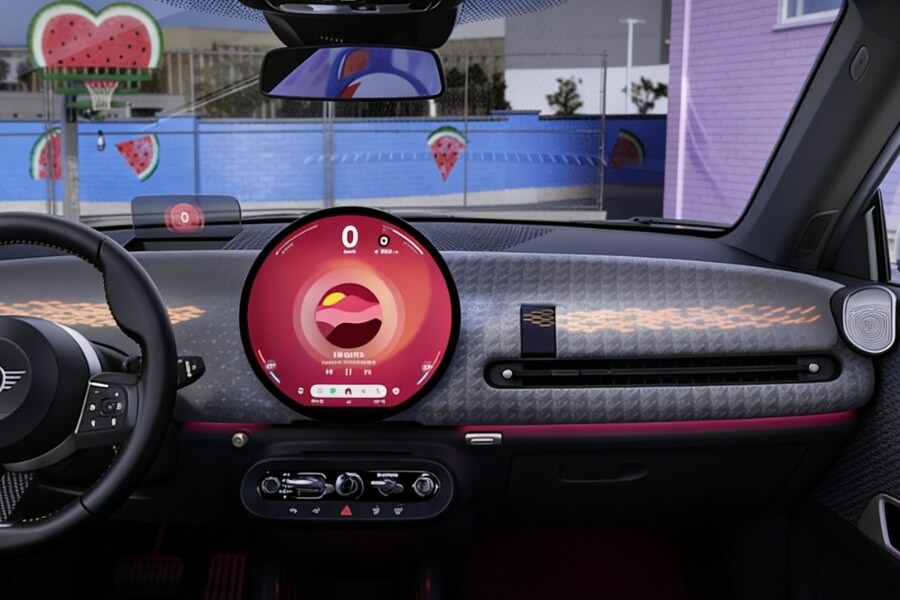
Automotive systems
Applied in:
- Digital instrument clusters
- Auxiliary displays
They preserve traditional dashboard layouts while enabling digital upgrades.
Medical devices
Used in:
- Portable analyzers
- Infusion systems
- Diagnostic tools
Clear visibility and stable performance are critical in these environments.
Consumer electronics
Widely used in:
- Smartwatches
- Smart speakers
- Smart home control panels
OLED is often preferred due to its low power and high contrast.
Commercial and retail environments
Round displays are used for:
- Product showcases
- Interactive installations
- Decorative digital elements
They enhance visual engagement without overwhelming the space.
How to Choose the Right Round Display for Your Application
Technology selection
- OLED for thin, high-contrast, battery-powered devices
- LCD for stable, cost-effective industrial applications
Size and resolution
Typical ranges:
- 1.1 to 4.2 inches
- 128×128 to 680×680 resolution
Higher resolution improves clarity but increases power consumption.
Brightness requirements
- Indoor use: 300 to 500 nits
- Semi-outdoor: 800 to 1000 nits
- Outdoor use: above 3000 nits
Higher brightness improves visibility in strong light conditions.
Touch requirements
- Capacitive touch for direct interaction
- Resistive touch for gloves or harsh environments
Interface compatibility
Common options include:
- SPI
- MIPI
- RGB
Choosing the right interface ensures smooth system integration.
Future Trends in Round Display Technology
Higher resolution and lower power consumption
Displays are becoming sharper while consuming less energy.
This is critical for portable and wearable devices.
Improved environmental adaptability
Industrial displays are expanding in:
- Temperature tolerance
- Brightness performance
- Structural durability
This allows them to operate reliably in demanding environments.
Integration with intelligent systems
Round displays are increasingly connected to IoT systems.
They function as both visual output and interaction interfaces.
Integration with transparent display solutions
Circular transparent displays are emerging in retail and exhibition environments.
They allow digital content to overlay physical products without blocking visibility.
This creates new possibilities for immersive and interactive display design.
FAQ
Q1: What is a round display?
A round display is a circular screen built using LCD or OLED technology. It is designed for applications where circular layouts improve readability and interface alignment, making it suitable for gauges, wearable devices, and compact control systems.
Q2: Where are round displays commonly used?
Round displays are used in smartwatches, industrial instruments, automotive dashboards, medical devices, and smart home panels. They are preferred in applications where circular layouts match how users read and interact with data.
Q3: Are round displays better than rectangular displays?
Round displays are better for circular interfaces such as gauges and dial-based controls. Rectangular displays are more efficient for content-heavy applications, especially when displaying text, data tables, or standard user interfaces.
Q4: Is OLED better than LCD for round displays?
OLED is better for thin, high-contrast designs, especially in wearable devices. LCD is more suitable for industrial applications where long-term stability, cost control, and consistent brightness are more important.
Q5: What are the main challenges of round displays?
Round displays face challenges such as backlight uniformity in LCD designs, lower production efficiency, reduced usable display area, and the need for custom UI layouts, which increase design complexity.
RUSINDISPLAY Solution Perspective
As round displays become part of modern device interfaces, display systems are no longer limited to basic screen output.
They are increasingly expected to support interaction, visual integration, and environment-specific design.
RUSINDISPLAY focuses on OLED, Transparent Display, and Indoor LCD solutions that extend beyond traditional display hardware.
Our systems are designed to integrate into retail, exhibition, and commercial environments where visual clarity, structural adaptability, and interaction all matter.
By combining display technology with system-level design and content integration, we help businesses build display solutions that are both functional and visually aligned with modern commercial spaces.