




Understanding HDMI LCD Display Technology
HDMI LCD displays are widely used in commercial signage, industrial control systems, and embedded display environments. By using a standardized HDMI interface, these displays transmit high-definition video and audio signals through a single cable. This simplifies installation and reduces system integration complexity.
An HDMI LCD display typically consists of three main components. These include the LCD panel, a controller board, and an LED backlight system. The HDMI signal enters the controller board, where the digital video signal is converted into timing signals that drive the LCD panel.
LCD technology itself is a non-emissive display system. The panel controls light transmission rather than generating light directly. A backlight module provides the illumination needed to produce visible images.
Early LCD screens relied on CCFL backlighting. Modern HDMI LCD displays now use LED backlight systems. LED technology improves energy efficiency, reduces display thickness, and increases brightness stability.
Industry data shows that LED backlit LCD displays consume more than 30 percent less energy compared with CCFL systems. Brightness uniformity can also improve by around 25 percent.
Panel technology also affects display performance. Many HDMI LCD screens use IPS panels to achieve viewing angles up to 178 degrees. This allows images to remain consistent when viewed from different positions.
VA panels offer another approach. They focus on higher contrast ratios, often reaching 3000 to 1 or higher. This improves black depth and visual detail in darker scenes.
Brightness selection is especially important for commercial installations. Different lighting environments require different brightness levels to maintain readability.
- Low ambient light environments such as museums or exhibition halls – 300 to 500 nits
- Standard indoor environments such as offices or retail stores – 500 to 700 nits
- High ambient light locations near windows – 1000 to 1500 nits
- Semi-outdoor installations – 2000 to 3500 nits
- Direct sunlight environments – 5000 to 7000 nits
Choosing the correct brightness ensures the HDMI LCD display remains visible in real operating conditions.
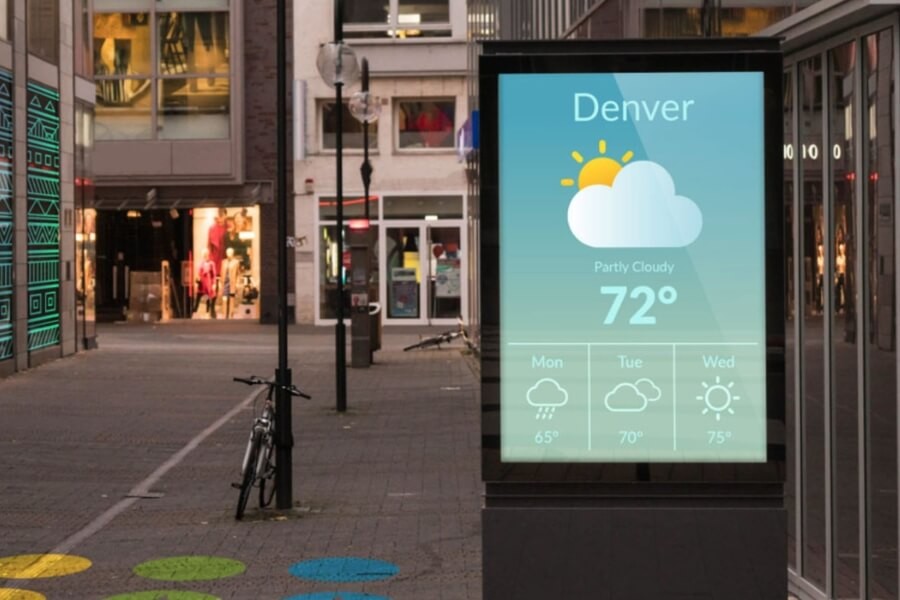
How to Connect and Configure HDMI LCD Displays
One of the main advantages of an HDMI LCD display is plug-and-play installation. The HDMI interface carries both video and audio signals through a single cable. This reduces wiring complexity and speeds up installation.
In many HDMI LCD screens with touch functionality, touch data is transmitted through a USB connection. Most operating systems automatically recognize the touchscreen without requiring additional drivers.
Connecting an HDMI LCD display usually involves three simple steps.
- Connect the HDMI cable between the source device and the display
- Connect the power supply to the display module
- Connect the USB cable if touch functionality is required
Once connected, the HDMI LCD screen typically mirrors or extends the desktop output of the source device.
Cable quality is important for stable signal transmission. Standard HDMI cables support common Full HD resolutions. However, higher bandwidth signals such as 4K at 60 Hz require certified High-Speed or Ultra-High-Speed HDMI cables.
Low-quality cables can cause several problems.
- Signal instability
- Screen flickering
- Failure to display content
For installations requiring longer signal transmission distances, several options are commonly used.
- HDMI fiber optic cables – transmission distances exceeding 100 meters
- HDMI over IP systems – distributing video signals through network infrastructure
- HDMI extenders – extending signals through Ethernet cables
When configuring an HDMI LCD monitor, color accuracy is another important factor. Delta E measures the difference between displayed color and reference color values.
- Delta E < 1 – color differences are invisible to the human eye
- Delta E 1–2 – suitable for professional visual work
- Delta E 2–4 – typical for most commercial displays
- Delta E > 4 – noticeable color deviation
Businesses that rely on accurate brand color representation often use color calibration tools to maintain consistency.
Common Indoor Applications of HDMI LCD Displays
HDMI LCD displays are used in a wide range of indoor commercial environments. Their flexible installation options allow them to adapt to different architectural layouts and communication needs.
Freestanding Digital Displays
Freestanding HDMI LCD displays typically use floor-standing structures. They are commonly placed in shopping malls, exhibition spaces, and retail showrooms.
These displays often include stable bases and movable wheels. Businesses can reposition the screens during promotional events or store layout changes.
Large screen sizes and high brightness levels help maintain visibility in complex lighting environments.
Wall-Mounted Digital Displays
Wall-mounted HDMI LCD screens are widely used in corridors, elevator halls, reception areas, and waiting zones. Their slim design allows them to blend into interior architecture.
Multiple wall-mounted screens can also be combined to form video walls. This configuration increases visual impact and allows larger digital content displays.
Ceiling-Mounted Displays
Ceiling-mounted HDMI LCD displays provide an efficient way to deliver information without occupying wall or floor space.
Retail stores often install ceiling displays above product shelves. Museums may place them above exhibit cabinets. Transportation hubs frequently use them for directional guidance.
Interactive Digital Displays
Interactive HDMI LCD displays combine touchscreen functionality with high-resolution visual output. This creates more engaging communication between users and digital systems.
Retail environments use interactive displays for product exploration and customization. Educational institutions use them as digital whiteboards. Hotels and event venues deploy them as interactive information terminals.
Retail Case Study – The Impact of Digital Displays
Retail environments increasingly rely on digital display networks to communicate with customers. HDMI LCD displays often serve as the visual hardware for these systems.
A well-known example comes from the American supermarket chain Albertsons. In 2025 the company launched a pilot digital display network inside its stores. After successful testing, Albertsons announced plans to expand the network to 800 stores across the United States by 2026.
The project was implemented with digital signage platform provider Stratacache. Walkbase sensor technology was used to measure customer engagement and audience behavior.
By comparing sales data between test stores and control stores, the company could quantify the real impact of digital screens on product performance.
During a promotional campaign for Sargento cheese crackers with Mondelēz, the digital display network increased product sales by 14 percent.
This case highlights the measurable business value of digital display systems. Digital signage allows businesses to update content instantly, rotate advertising campaigns, and analyze viewer engagement.
LCD vs OLED vs MiniLED – Key Display Technology Differences
Selecting the right display technology requires understanding the strengths and limitations of each option.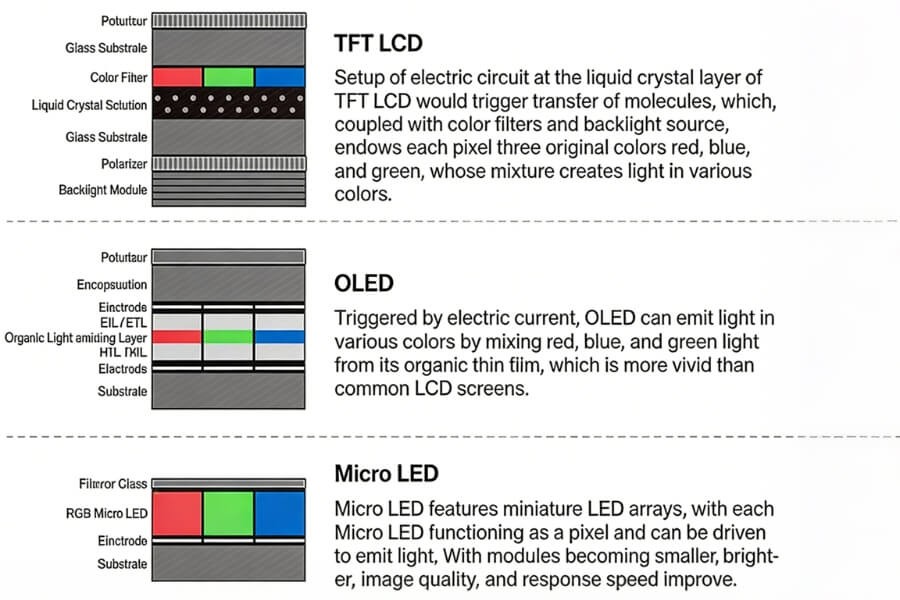
LCD Displays
LCD displays with LED backlighting remain one of the most widely used technologies in commercial display systems.
Advantages include:
- Lower production cost
- No burn-in risk
- High brightness capability
- Long operational lifespan
- Strong visibility in bright environments
Limitations include:
- Contrast depends on backlight design
- Black levels are not perfectly pure
- Response speed is slower than emissive displays
Typical applications include digital signage networks, industrial control panels, and information displays.
OLED Displays
OLED displays use self-emissive pixels. Each pixel produces its own light, allowing extremely high contrast ratios.
Advantages include:
- True black levels
- Extremely fast response time
- Rich color performance
- Flexible display designs
Limitations include:
- Potential burn-in risk
- Lower peak brightness than LCD
- Higher production cost
MiniLED Technology
MiniLED improves LCD performance by adding thousands of local dimming zones to the backlight system. This increases contrast while maintaining the high brightness and durability of LCD displays.
MiniLED displays are widely used in control rooms, professional monitoring environments, and high-contrast commercial displays.
How AI Is Changing Commercial Display Systems
Artificial intelligence is gradually transforming display systems from passive content screens into intelligent communication platforms.
At the 2026 Mobile World Congress, several manufacturers demonstrated new AI-driven display technologies. TCL introduced the concept of Display for AI, emphasizing that display design must balance image quality, energy consumption, and computing requirements.
In commercial environments, AI technology can improve display system operation in several ways.
- Adaptive brightness adjustment based on ambient light
- Audience detection to optimize content presentation
- Predictive maintenance through system monitoring
- AI-assisted content generation for digital signage
These technologies are gradually expanding the role of digital displays beyond simple information presentation.
FAQ
Q1: Can HDMI LCD displays be used as a second monitor?
Yes. HDMI LCD displays can function as secondary or extended monitors. Most operating systems including Windows, macOS, and Linux automatically detect the display after an HDMI connection is established. Users can mirror the main screen or extend the desktop workspace, making HDMI LCD screens useful for control panels, monitoring dashboards, and multitasking environments.
Q2: What brightness level is required for outdoor displays?
Outdoor brightness requirements depend on surrounding light conditions. Semi-outdoor installations typically require 2000 to 3500 nits to remain visible. Displays exposed to direct sunlight may need 5000 to 7000 nits to maintain readability. Selecting the correct brightness level ensures that content remains clear throughout the day in changing lighting environments.
Q3: How should refresh rate be selected?
A refresh rate of 60 Hz is sufficient for most digital signage and information display applications. Higher refresh rates such as 120 Hz are useful when displaying fast-moving video content, interactive touch interfaces, or camera-recorded screens. A higher refresh rate reduces motion blur and provides smoother visual performance.
Q4: Is 4K resolution necessary for digital signage?
4K resolution is most beneficial when viewers are close to the screen. Higher pixel density improves text clarity and image detail in retail stores, reception areas, and exhibition displays. For large outdoor displays viewed from greater distances, lower resolutions can still provide effective visual communication.
Q5: Which is better for digital signage – LCD or OLED?
LCD displays are typically preferred for digital signage because they offer higher brightness, longer operating lifespans, and lower cost. OLED displays provide superior contrast and deeper blacks but are more suitable for premium visual installations rather than continuous commercial signage operation.