




Introduction
As digital transformation accelerates across industries, display technology has become more than a simple information output tool. In commercial environments, displays act as a key touchpoint between brands and customers.
From retail digital signage and shopping mall video walls to airport information displays and museum installations, modern commercial spaces rely heavily on large-format screens to communicate with visitors. Stable performance and visual reliability directly influence how audiences experience these environments.
However, TFT LCD displays may face various risks if installed improperly or used under unfavorable conditions. This guide explains the structure of TFT displays, the mechanisms behind common damage, and the practical strategies that help protect commercial display systems. It also explores how reliable display solutions help businesses maintain stable visual performance in demanding environments.

How TFT Displays Work
To understand how TFT displays can be damaged, it is important to first examine their internal structure.
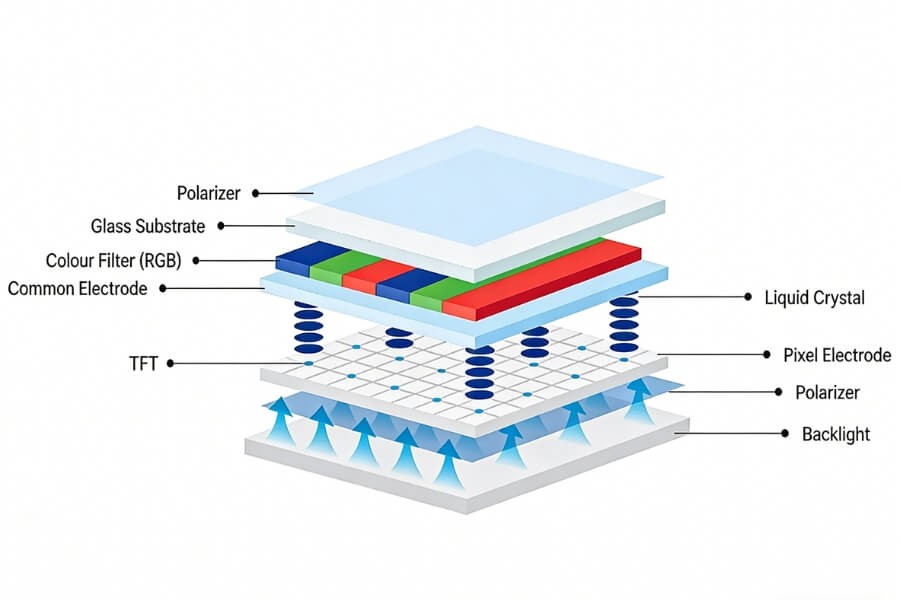
A TFT LCD panel is built as a multilayer optical and electronic system. Its primary components include:
- Backlight source that provides illumination
- Polarizer layers that control the direction of light
- Liquid crystal layer that adjusts light transmission when voltage is applied
- TFT glass substrate containing thin-film transistors and ITO signal lines
The TFT glass substrate is responsible for controlling each pixel’s brightness and color through the transistor matrix. This structure enables high resolution, accurate color reproduction, and fast response time.
However, because these electronic circuits are built on thin glass layers, the display panel is mechanically delicate. Mechanical stress or improper handling can damage the internal structure.
Common Types of TFT Display Damage
Display damage generally falls into two categories. These include physical structural damage and operational or electrical faults.
Understanding these failure modes helps identify problems quickly and apply appropriate preventive measures.
Liquid Crystal Layer Damage
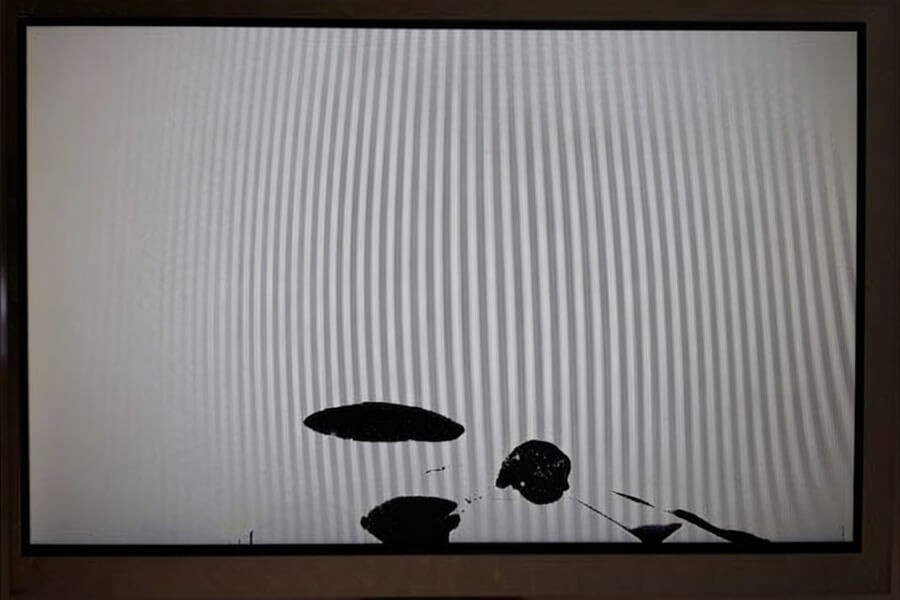
Damage to the liquid crystal structure often appears as irregular dark patches with sharp edges across the display surface.
This occurs when the glass substrate cracks and the liquid crystal layer loses its controlled molecular alignment. Without proper alignment, the affected areas block light rather than transmitting it.
This type of damage is usually permanent because the internal optical structure of the panel has been disrupted.
ITO Line Damage and Display Lines
Another common issue is the appearance of horizontal or vertical lines across the screen.
This symptom typically indicates that the ITO signal lines within the TFT layer have been interrupted. When these conductive pathways break, an entire row or column of pixels loses its control signal.
This failure is often caused by excessive mechanical pressure applied to the display corners during installation.
Dead Pixels and Stuck Pixels
Dead pixels appear as small black dots on the screen. Stuck pixels remain fixed in one color, usually red, green, or blue.
These defects occur when the pixel transistor fails or when the liquid crystal alignment cannot change properly. A limited number of pixel defects may appear during manufacturing and may gradually increase as the display ages.
Image Retention and LCD Burn-In
Image retention occurs when a previously displayed static image remains faintly visible after the content changes.
In TFT LCD displays this effect is usually temporary. It occurs when pixels are driven unevenly for extended periods, which causes ionic imbalances within the liquid crystal layer.
Unlike OLED burn-in, LCD image retention often disappears after displaying dynamic content or allowing the display to rest.
ESD Damage in TFT Displays
Electrostatic discharge, commonly referred to as ESD, can damage the internal circuits of a display panel.
Static electricity may weaken semiconductor structures inside the driver IC or control circuitry. The resulting faults may appear as flickering, unstable pixels, or permanent failure.
Proper electrostatic protection during installation and assembly is essential.
What Causes TFT Display Damage
Several factors contribute to display failures in commercial environments.
Mechanical pressure is one of the most common causes. Excess force during installation can stress the glass substrate and interrupt internal circuitry.
Other contributing factors include:
- Excessive mounting pressure during installation
- Twisting or bending of the display housing
- Static electricity during assembly
- Long periods of static images
- High operating temperatures
- Poor ventilation inside display enclosures
In commercial applications such as retail video walls, airport signage systems, and museum interactive displays, screens often operate for extended hours. If installation frames or mounting brackets distribute pressure unevenly, the internal glass layers may gradually experience structural stress.
Proper installation design helps reduce this risk.
How to Prevent TFT Display Damage
Preventing display damage requires proper handling, installation practices, and electrical protection.
In commercial display projects such as shopping mall video walls, retail digital signage networks, or airport information displays, screens are often installed in large arrays or enclosed cabinets. These installations require careful structural planning to avoid uneven stress across the panel.
The following practices help protect TFT displays during deployment.
Handle TFT Displays by the Frame
Display modules should always be held by the outer frame.
Pressing directly on the screen surface can apply uneven pressure to the fragile internal layers. Even small amounts of force may damage the liquid crystal structure.
Control Mounting Pressure During Installation
Installation screws must follow the manufacturer’s torque specifications.
Excessive tightening can deform the housing and apply pressure to the panel corners. This may interrupt the ITO lines and produce permanent display lines.
Ensure Proper Ventilation and Cooling
Thermal management is essential for long-term reliability.
Display enclosures should allow sufficient airflow around the panel. Excessive heat accelerates the aging of backlight LEDs, polarizers, and liquid crystal materials.
Proper ventilation improves stability and extends the lifespan of the display.
Avoid Long Static Images on the Screen
In applications such as menu boards or information displays, static images may remain on the screen for extended periods.
Using screen savers, rotating content, or dynamic visual elements distributes pixel activity evenly. This reduces the risk of image retention.
Use ESD Protection During Assembly
Technicians should use antistatic wrist straps and grounded work surfaces when handling display components.
These precautions significantly reduce the risk of electrical damage during installation.
Maintenance Tips to Extend TFT Display Life
Regular maintenance helps preserve display performance over time.
Recommended practices include:
- Cleaning the screen with a soft microfiber cloth
- Avoiding harsh chemicals that may damage the polarizer coating
- Maintaining stable operating temperatures
- Adjusting brightness levels based on ambient lighting conditions
- Inspecting signal cables and connectors regularly
In environments such as retail stores, transportation hubs, and museums, displays may operate continuously throughout the day. Periodic maintenance checks help ensure stable performance and reduce the risk of unexpected display failures.
Selecting TFT Displays for Commercial Environments
Commercial display systems operate under demanding conditions.
Retail stores, transportation hubs, museums, and corporate lobbies often require displays that run continuously for many hours each day. In these environments, structural design, cooling performance, and installation flexibility become critical factors.
Video wall systems used in shopping malls, control rooms, and airport terminals must maintain consistent brightness and stable image quality even during long operating cycles.
Professional commercial displays are engineered with stronger housings, improved thermal design, and stable electronic components that support long-term reliability.
FAQ
Q1: How long does a TFT LCD display typically last?
Most commercial TFT LCD displays provide a backlight lifespan between 40,000 and 60,000 hours. With moderate brightness settings and proper ventilation, many displays operate reliably for seven to ten years. Environmental conditions such as temperature, humidity, and installation quality can influence the actual service life.
Q2: How can I determine whether a display issue is hardware or signal related?
A simple cross-device test often helps identify the source of the problem. Connect the display to another signal device such as a computer or media player. If the issue remains, the display hardware may be damaged. If the issue disappears, the problem likely originates from the signal source or cable.
Q3: Can image retention on TFT displays be repaired?
In many cases, image retention on TFT LCD screens is temporary. Turning off the display for several hours or running dynamic content can help restore normal pixel behavior. Rotating screen content regularly and avoiding long static images also helps prevent the issue from recurring.
Q4: What brightness level is recommended for indoor commercial displays?
Indoor commercial displays typically require brightness levels between 500 and 700 nits for comfortable viewing. Environments with stronger ambient lighting, such as storefront windows or transportation hubs, may require brightness levels closer to 1,000 nits to maintain clear and readable images.
Q5: What is the most common cause of TFT display damage?
Improper installation pressure is one of the most frequent causes of TFT display damage. Excessive mechanical stress applied to the display housing or panel edges can crack the internal glass layers and interrupt signal lines. Careful handling and proper mounting design help prevent these structural failures.
RUSINDISPLAY delivers professional OLED, Transparent Display, and Indoor LCD solutions with rapid 3D scene creation, reliable performance, and support from over 120 global brands. Our systems help businesses increase foot traffic and achieve fast ROI while enjoying steady technical support and seamless after-sales service.
Whether you're looking for cutting-edge OLED technology or traditional LCD applications for digital signage, our solutions offer flexibility and innovation across a variety of environments. With AI-driven interaction and a Tech in Nature design philosophy, we create visual experiences that blend innovation with modern commercial environments.