




Digital displays operate for long hours in retail stores, transportation hubs, corporate spaces, and public venues. When static images remain visible for extended periods, a faint ghost image may appear on the screen. This effect is known as Image Retention.
Understanding how Image Retention occurs helps businesses maintain consistent visual quality and protect display performance. With the right content design and display configuration, most retention effects can be minimized in real-world installations.
Understanding Image Retention in Modern Displays
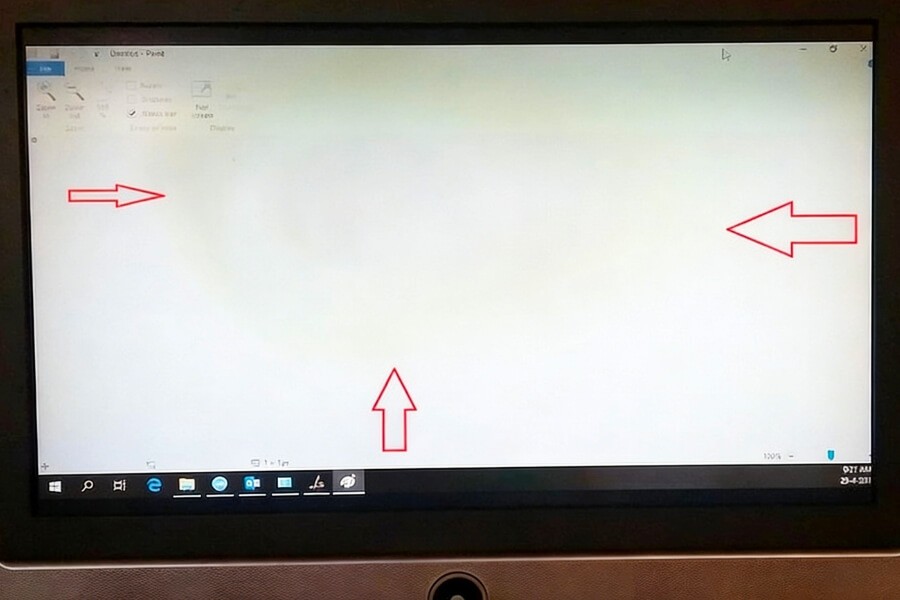
Image Retention is a temporary visual artifact that appears when a static image remains on a screen for an extended time.
A faint outline of previously displayed content may remain visible after the screen changes to new content. In most cases, the effect gradually disappears once the display begins showing dynamic images again.
This phenomenon is most commonly observed in LCD displays used in digital signage systems and information screens.
What Is Image Retention in Displays
Image Retention occurs when certain pixels remain influenced by previously displayed content.
After a static image disappears, a faint shadow of that image may remain visible for a short time. This happens because the electrical state of some pixels does not immediately return to normal.
Unlike permanent panel damage, Image Retention typically resolves itself once the display begins showing moving content or varied visuals.
Image Retention vs Burn-In – What’s the Difference
Image Retention is often confused with burn-in, but the two effects are fundamentally different.
Image Retention is temporary. Pixel states gradually recover after the screen displays new or dynamic content.
Burn-in refers to permanent display damage caused by uneven pixel aging. This problem is most often associated with OLED displays when static images remain in the same position for extremely long periods.
For LCD displays, Image Retention is more common and usually far less serious.
How Image Retention Happens
Image Retention occurs when electrical conditions within display pixels become temporarily unbalanced after long periods of static content.
This situation can appear when screens continuously display elements such as channel logos, navigation bars, interface panels, or digital signage banners.
Because these graphics remain fixed on the screen, the same group of pixels is activated repeatedly while surrounding pixels change less frequently. This uneven activity can produce a temporary ghost image.
Image Retention in LCD Displays
In LCD displays, liquid crystal molecules control how light passes through the panel.
When static content remains visible for long periods, some liquid crystal molecules may stay partially aligned with the previous electrical signal. When the image changes, those molecules require time to return to their neutral position.
This brief delay produces the faint shadow known as Image Retention.
Why OLED Displays Face Burn-In Instead
OLED technology works differently from LCD displays. Each pixel in an OLED panel emits its own light.
When certain pixels remain active for longer periods, they degrade faster than surrounding pixels. Over time, this uneven aging can create permanent brightness differences known as burn-in.
Modern OLED displays include features such as pixel shifting and brightness management to reduce this risk.
Which Displays Are Most Affected by Image Retention
Image Retention is most likely to appear in displays that operate continuously with static content.
Common examples include digital signage displays, airport information screens, financial trading monitors, and security control room panels.
In these environments, interface elements or information layouts often remain fixed for long periods. Displays that frequently show varied or dynamic content are much less likely to experience noticeable retention.
Where Image Retention Appears in Real Applications
In commercial environments, Image Retention usually appears in predictable screen locations.
Typical examples include broadcast logos, menu interfaces, navigation panels, and information tickers.
Because these elements stay in fixed positions, the same pixels are activated repeatedly. Designing content with periodic movement helps distribute pixel activity across the display and maintain consistent image quality.
How Long Does Image Retention Last
Image Retention usually disappears after the display returns to dynamic content.
In many cases, the ghost image fades within several minutes. More noticeable retention may take a few hours before fully disappearing.
The recovery time depends on several factors, including how long the static image remained visible, the display brightness during operation, and the specific panel technology used.
How to Prevent Image Retention
Preventing Image Retention involves managing both display settings and content design.
Several simple operational strategies can significantly reduce the likelihood of retention artifacts.
General Best Practices
Organizations operating digital signage or monitoring displays can reduce retention risks by rotating visual layouts regularly, avoiding static logos that remain in one position, scheduling dynamic content between static messages, and enabling automatic brightness adjustment.
These practices help distribute pixel activity more evenly across the screen.
LCD Maintenance Tips to Reduce Image Retention
Proper LCD maintenance also helps maintain long-term display quality.
Recommended practices include lowering brightness during overnight operation, enabling screen savers when displays remain idle, and occasionally running full-screen color cycling patterns. These methods allow liquid crystal molecules to return to balanced alignment.
How OLED Displays Reduce Burn-In Risk
Modern OLED displays incorporate built-in protection technologies.
Examples include pixel shifting, automatic brightness limiting, and periodic panel refresh cycles.
Pixel shifting slightly moves the displayed image across the panel. This distributes pixel usage and prevents localized wear from developing in one region of the display.
Content Design Strategies for Digital Signage
In commercial installations, Image Retention often results from content layout rather than display hardware.
Digital signage systems should avoid fixed interface elements that remain unchanged for long periods.
Effective strategies include rotating promotional layouts, animating logos or banners, shifting interface elements slightly across the screen, and scheduling video content between static messages. These approaches maintain balanced pixel activity and support long-term display stability.
Future Display Trends – AI, Transparent Displays, and Digital Signage
Display technology continues evolving as organizations adopt more interactive visual communication systems.
Emerging innovations combine artificial intelligence, transparent display structures, and integrated digital signage platforms.
These technologies improve visual impact while also helping displays operate more efficiently in long-term commercial environments.
AI-Driven Content Management
AI-powered digital signage platforms can automatically adjust displayed content based on environmental data or audience behavior.
For example, advertising layouts may change depending on the time of day or viewer demographics. This dynamic content scheduling reduces static display time and naturally lowers the risk of Image Retention.
Transparent OLED and LCD Displays
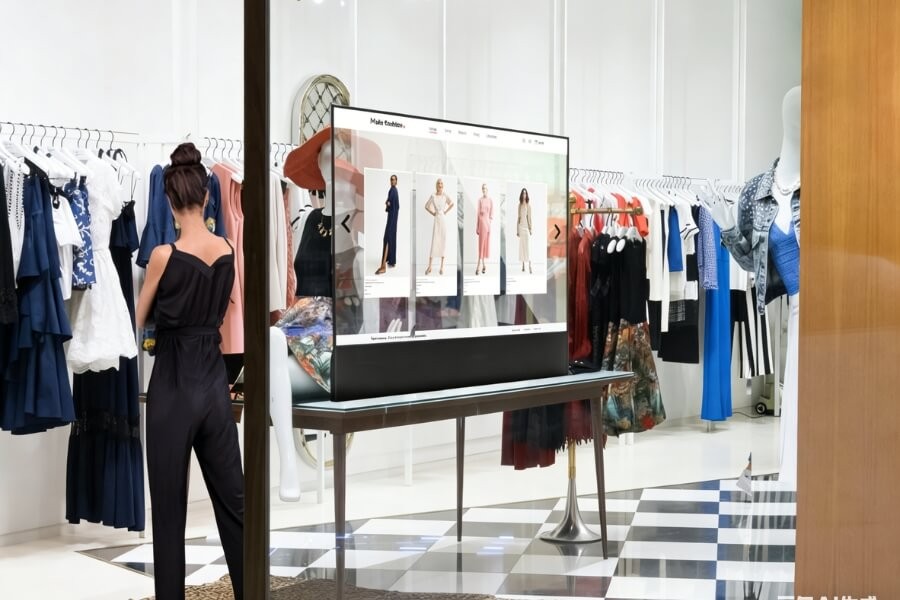
Transparent displays are increasingly used in retail storefronts, museums, and product showrooms.
Transparent OLED technology creates self-emitting pixels that allow digital images to appear in front of physical products behind the screen. This effect supports immersive retail and exhibition experiences.
Transparent LCD provides a more cost-efficient option for large installations where moderate Transparency and integrated backlighting are acceptable.
These technologies allow digital messaging to coexist with physical environments while maintaining natural lighting.
Why LCD Still Dominates Commercial Displays
Despite the growth of OLED technologies, LCD remains the most widely used solution for commercial display installations.
LCD panels provide long operating lifespans, stable brightness performance, and cost-efficient production for large screen sizes.
These advantages make LCD displays well suited for transportation systems, control rooms, and large digital signage networks.
Key Takeaways About Image Retention
Image Retention is a temporary display artifact rather than permanent screen damage.
The effect occurs when static images remain visible for extended periods and certain pixels require time to return to their normal state.
With proper content design, brightness management, and operational scheduling, most Image Retention effects can be minimized in commercial display environments.
Choosing the Right Display for Your Business
Selecting a display involves more than choosing screen size or resolution. Installation environment, operating hours, and content structure all influence long-term display performance.
Retail storefront installations benefit from high Transparency displays that allow digital content to blend with physical products. Large information screens in transportation hubs require high brightness and reliable operation during long service hours.
RUSINDISPLAY delivers professional OLED, Transparent Display, and Indoor LCD solutions with rapid 3D scene creation, reliable performance, and support from over 120 global brands. Our systems help businesses increase foot traffic and achieve fast ROI while enjoying steady technical support and seamless after-sales service. Whether you're looking for cutting-edge OLED technology or traditional LCD applications for digital signage, our solutions offer flexibility and innovation across a variety of environments. With AI-driven interaction and a Tech in Nature design philosophy, we create visual experiences that blend innovation with modern commercial environments.
FAQ
Q1: What does Image Retention mean?
Image Retention refers to a temporary ghost image that remains visible after a static picture has been displayed for a long time. It occurs when display pixels need time to return to their normal state. Unlike burn-in, Image Retention usually fades after the screen shows dynamic content or rests briefly.
Q2: How can you tell if it is burn-in or Image Retention?
Image Retention is temporary and gradually disappears after the display shows moving images or remains powered off for a short period. Burn-in is permanent and stays visible regardless of the content displayed. If the ghost image fades over time, the issue is most likely Image Retention.
Q3: Can LCD burn be repaired?
Permanent burn damage usually cannot be repaired because it results from uneven pixel aging. However, temporary Image Retention may disappear after the display shows dynamic content or remains powered off for a recovery period. Proper content rotation and brightness control help reduce the risk.
Q4: Which images are most likely to cause LCD burn?
High contrast static graphics create the greatest risk. Bright logos, navigation bars, scoreboards, and menu interfaces that remain fixed on the screen for long periods can cause uneven pixel activity. Displays that regularly show changing content are much less likely to develop retention effects.
Q5: How does pixel shifting prevent burn?
Pixel shifting moves the displayed image slightly across the screen at regular intervals. This spreads pixel activity across a wider area instead of stressing the same pixels continuously. As a result, the display panel ages more evenly and the risk of burn or retention artifacts is reduced.