




What Are Bad Pixels on a Screen
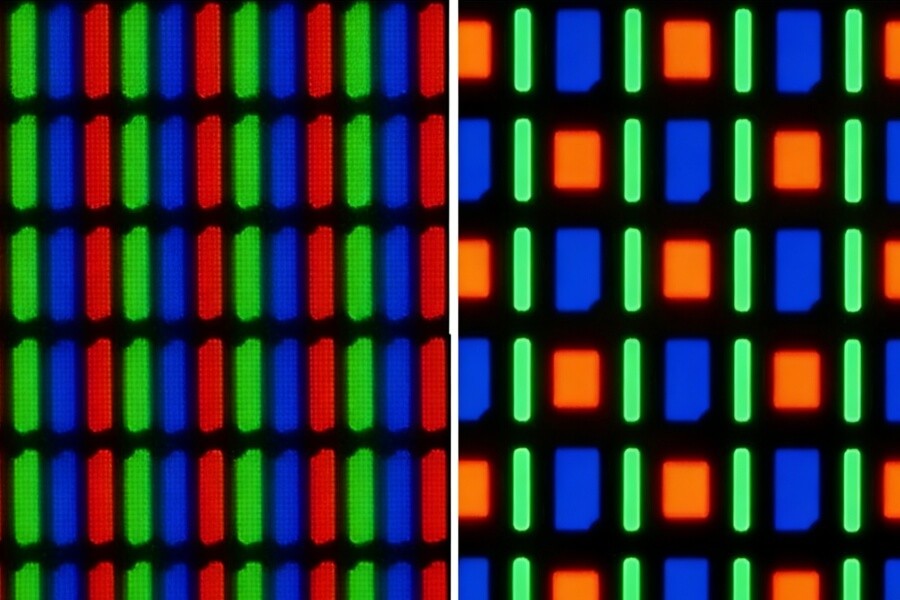
Modern displays are built from millions of tiny picture elements called pixels. Each pixel contains smaller red, green, and blue subpixels that work together to produce color and brightness.
When a pixel stops behaving normally, it becomes what people commonly call a bad pixel. The defect may appear as a bright dot, a dark dot, or a pixel that remains stuck on one color.
Although the issue may look serious, a single pixel defect rarely affects the overall performance of a display panel. In commercial environments such as digital signage, retail displays, and exhibition screens, understanding pixel behavior helps operators distinguish between a minor visual defect and a true hardware problem.

Types of Bad Pixels Found on Displays
Not all pixel defects behave the same way. The most common types include bright pixels, dead pixels, and stuck pixels.
Bright Pixels
A bright pixel stays permanently lit even when the display should show a dark image. This happens when the transistor controlling the pixel remains active, causing the pixel to emit light continuously regardless of the signal it receives.
Bright pixels are easiest to notice when the screen displays dark scenes or black backgrounds.
Dead Pixels
A dead pixel remains permanently off and appears as a small black dot on the screen. This defect usually occurs when the transistor responsible for driving the pixel fails completely.
Without electrical control, the pixel cannot illuminate. Dead pixels are most visible when the screen shows bright colors or white backgrounds.
Stuck Pixels
A stuck pixel remains locked on a single color such as red, green, or blue. Unlike dead pixels, the pixel still receives power but cannot correctly switch between color signals.
In some cases, stuck pixels may recover after running color cycling programs or pixel refresh patterns.
What Causes Dead Pixels and Bright Pixels
Pixel defects usually originate from microscopic electrical variations inside the display panel.
Manufacturing Variations
Modern displays contain millions of thin-film transistors that control pixel behavior. Even highly controlled manufacturing processes can occasionally produce small electrical inconsistencies.
International production standards allow a very limited number of pixel defects because completely eliminating them across millions of pixels is technically challenging.
Transistor Control Failure
Each pixel depends on a thin-film transistor to regulate brightness and color. If this transistor becomes unstable or stops responding, the pixel may remain permanently on or permanently off.
This is one of the most common causes of dead pixels.
Material Aging
Display materials slowly degrade after thousands of operating hours. Heat, electrical stress, and environmental conditions can influence how quickly this process occurs.
Although modern panels are designed for long lifespans, individual pixels may occasionally fail during extended operation.
Static Content Exposure
Commercial displays sometimes show the same interface elements for long periods. Logos, navigation bars, and information panels may stress the same pixel areas continuously.
Content rotation and pixel shifting technologies help distribute screen usage more evenly across the panel.
Bright Pixel vs Dead Pixel
Understanding the difference helps determine whether a defect may be temporary or permanent.
Bright pixels appear as small glowing dots because the pixel remains electrically active. Dead pixels appear as dark dots because the transistor controlling the pixel has stopped functioning.
Both defects represent isolated pixel failures rather than large display system problems.
How to Test a Screen for Bad Pixels
Technicians and installers often perform visual tests to identify defective pixels.
Display Solid Color Patterns
Full-screen color patterns make it easier to detect abnormal pixels. Common testing colors include white, black, red, green, and blue.
Each color highlights different types of pixel behavior.
Inspect the Screen Carefully
Move closer to the display and scan slowly across the screen. Defective pixels typically appear as dots that do not match the surrounding color pattern.
High-resolution screens may require careful inspection because individual pixels are extremely small.
Use Pixel Test Software
Diagnostic tools automatically cycle color patterns across the screen. These tools help technicians quickly identify bright pixels, dead pixels, and stuck pixels during installation or maintenance checks.
Can Bad Pixels Be Fixed
The possibility of repair depends on the type of defect affecting the pixel.
Pixel Refresh Procedures
Some displays include built-in refresh systems that stimulate subpixels using rapid color transitions. This process may occasionally restore partially stuck pixels.
Color Cycling Techniques
Software utilities can cycle through many color transitions in a short period of time. In some situations, these transitions may help recover stuck pixels.
Hardware Replacement
Dead pixels caused by transistor failure generally cannot be repaired. If the number of defective pixels exceeds manufacturer tolerance standards, the display panel may qualify for warranty replacement.
Are Bad Pixels Normal in High Resolution Displays
Modern displays contain extremely large numbers of pixels.
A 4K display includes more than eight million pixels, while an 8K display contains over thirty-three million pixels. Because of this scale, a few defective pixels represent only a tiny fraction of the screen.
Industry manufacturing standards define acceptable pixel defect limits during quality inspection and testing.
Pixel Defects in LCD vs OLED Displays
LCD and OLED displays use different technologies to produce images.
LCD panels rely on backlighting combined with liquid crystal layers controlled by thin-film transistors. Pixel defects usually originate from transistor irregularities or liquid crystal variations.
OLED displays generate light directly at each pixel through organic materials. Over time, brightness aging or material fatigue may influence pixel behavior, although modern driver electronics help maintain visual consistency.
Preventing Pixel Problems in Commercial Displays
Although some pixel defects are unavoidable, proper display management helps reduce the risk of visible issues.
Avoid Static Content
Rotating digital signage content helps prevent uneven pixel stress. Dynamic content scheduling distributes screen activity across different areas of the display.
Enable Screen Protection Features
Many professional displays include protective technologies such as pixel shifting, automatic refresh cycles, and brightness balancing systems.
These features extend the operational lifespan of the display panel.
Maintain Proper Thermal Conditions
Heat can influence electronic reliability over long operating periods. Adequate ventilation, stable power supply, and controlled installation environments help protect display components.
Real World Environments Where Pixel Stability Matters
Pixel reliability becomes particularly important in high-visibility commercial environments.
Retail storefront displays must maintain consistent image quality because even small defects may affect customer perception.
Exhibition displays often operate continuously for long periods, placing additional stress on display electronics.
Corporate showrooms and digital advertising walls require reliable image performance to maintain professional visual presentation.

Transparent OLED Displays and Pixel Management
Transparent OLED displays introduce additional engineering challenges because the screen must balance brightness, transparency, and structural stability.
The pixel structure used in transparent panels differs from traditional LCD systems. Engineers must carefully manage light transmission, pixel spacing, and electrical control.
Reliable integration of these technologies ensures that transparent displays perform consistently in retail glass walls, museums, automotive showrooms, and architectural installations.
Companies specializing in transparent display systems such as RUSINDISPLAY focus on optimizing panel structure, thermal design, and content management systems to support long-term performance in real commercial environments.
The Future of Pixel Reliability
Display engineering continues to evolve as new materials and control systems improve reliability.
Advanced OLED materials provide better brightness stability and longer operational lifespan. More precise driver electronics allow displays to regulate pixel behavior with greater accuracy.
Artificial intelligence based calibration technologies are also emerging, helping monitor display performance and automatically adjust image parameters to maintain long-term visual consistency.
Reliable Display Engineering for Commercial Projects
In professional environments such as retail stores, exhibitions, transportation hubs, and corporate showrooms, display reliability is just as important as visual quality.
A well-designed display system combines panel technology, thermal management, installation planning, and intelligent content control to reduce pixel stress and maintain stable performance.
RUSINDISPLAY delivers professional OLED, Transparent Display, and Indoor LCD solutions with rapid 3D scene creation, reliable performance, and support from more than 120 global brands. Our systems help businesses increase foot traffic and achieve fast ROI while maintaining dependable technical support and seamless after-sales service.
Whether integrating advanced Transparent OLED installations or traditional digital signage networks, RUSINDISPLAY focuses on creating display solutions that operate reliably in real commercial environments.
FAQ
Q1: What causes bad pixels on a screen?
Bad pixels usually result from microscopic transistor defects inside the display panel. Manufacturing variations, electrical stress, or long-term material aging can cause individual pixels to remain permanently on, permanently off, or locked on a single color. These defects normally affect isolated pixels rather than the overall display performance.
Q2: Can a dead pixel repair itself?
Dead pixels rarely recover because the thin-film transistor controlling the pixel has failed completely. Since the electrical signal cannot reach the pixel, it cannot produce light. Stuck pixels may sometimes recover through pixel refresh tools or rapid color cycling techniques.
Q3: How many bad pixels are acceptable on a display?
Most manufacturers follow international pixel defect standards that allow a limited number of defective pixels. Because modern displays contain millions of pixels, a few isolated defects usually fall within acceptable quality thresholds and rarely affect overall visual performance.
Q4: Are bad pixels common in OLED displays?
Bad pixels can occur in both LCD and OLED displays. OLED panels generate light directly from each pixel, while LCD panels rely on backlighting systems. Although the failure mechanisms differ, modern manufacturing processes significantly reduce the probability of visible pixel defects.
Q5: Do bad pixels spread across the screen?
Bad pixels usually remain isolated and do not spread across the display panel. However, overheating, electrical instability, or physical damage may increase the risk of additional pixel failures over time if the display operates in unsuitable environmental conditions.